Introduction
"I really don't want to touch this module..."
If you've been developing software long enough, you know this feeling. Every change breaks something else. Tests are painful to write. Understanding what the code even does feels impossible. These symptoms share a common root cause: modules that depend too heavily on each other—the problem of coupling.
Coupling problems are insidious. They're hard to notice while you're writing code, only revealing themselves later when you wonder why changes are so difficult. What makes it worse is that even when you know "coupling is too tight," it's hard to see exactly where and how, or where to start fixing it.
Looking back, I realize my understanding of coupling was quite shallow. I was making judgments based on vague feelings—"this seems tightly coupled" or "loose coupling is supposedly better"—but when I tried to articulate why, I couldn't explain it clearly.
To address this lack of visibility, we need a way to measure coupling. But the traditional single axis of "strong vs. weak" isn't enough. The same "strong coupling" means different things depending on where it occurs and in what context.
This brings us to Vlad Khononov's concept of "Balanced Coupling." It's a framework that evaluates coupling across three dimensions: strength, distance, and volatility, then assesses their balance. cargo-coupling is a tool I developed to implement this framework for Rust projects.
Even as AI writes more of our code, this coupling metric becomes increasingly important. Regardless of who or what writes the code, humans still need to understand, maintain, and extend it. In fact, precisely because AI generates code, we need objective measures to evaluate its structure.
Let's start with an overview of the tool, then explore the underlying concepts, and finally see how to use it in practice.
What is cargo-coupling?
cargo-coupling is a coupling analysis tool I developed for Rust projects.
The inspiration came from Vlad Khononov's book "Balancing Coupling in Software Design." The challenges I had vaguely sensed about coupling design were systematically organized in this book. I was impressed by the framework that captures coupling through three dimensions—strength, distance, and volatility—and wanted to create a tool that makes this practical for Rust projects. I highly recommend picking up the book.
The tool is available on GitHub. If you find it useful, I'd appreciate a star!
crates.io: https://crates.io/crates/cargo-coupling
Now, let's challenge a common assumption.
"Coupling should be minimized"—isn't that what you believe?
This tool doesn't aim to "reduce coupling." It aims to "design coupling appropriately." Why? Because coupling isn't inherently bad. Related functionality working closely together is natural. The problem is "strong coupling in inappropriate places" or "tight coupling between distant modules." This shift in perspective is at the heart of this tool.
# Installation
cargo install cargo-coupling

# Basic usage
cargo coupling ./src
Analyzing Coupling Across Three Dimensions
So what exactly constitutes "appropriate coupling"?
Traditional coupling analysis tends to think in terms of a single "strong/weak" axis. But stop and consider: strong coupling with an adjacent module versus strong coupling with a distant external library—shouldn't these mean different things? And coupling with code unchanged for five years versus coupling with code modified weekly—shouldn't these carry different risks?
A single axis can't capture these differences. cargo-coupling measures coupling across three independent dimensions.
1. Integration Strength
The first dimension is "coupling strength"—how much modules know about each other's internals.
Have you seen code like user.password_hash that directly accesses struct fields? That's the strongest form of coupling. Meanwhile, code that interacts through impl Trait works without knowing the other's internals. This difference gets quantified as a score.
| Level | Score | Description | Rust Example |
|---|---|---|---|
| Intrusive | 1.00 | Direct dependency on internal implementation | struct.field direct access |
| Functional | 0.75 | Dependency on function signatures | Method calls |
| Model | 0.50 | Dependency on data structures | Type definitions, type parameters |
| Contract | 0.25 | Interface/trait only | impl Trait |
2. Distance
The second dimension is "distance"—how far apart coupled modules are in the code's scope hierarchy.
Functions within the same file working closely together is natural. But what if src/auth/login.rs directly references src/billing/invoice.rs? Or worse, depends on an external crate's internal structure? The farther the distance, the "heavier" that coupling becomes.
| Level | Score | Description |
|---|---|---|
| SameModule | 0.25 | Within the same file/module |
| DifferentModule | 0.50 | Different module in the same crate |
| DifferentCrate | 1.00 | External crate dependency |
3. Volatility
The third dimension is "volatility"—how frequently the code changes.
Your project surely has stable modules untouched for over a year alongside modules modified weekly. Depending on stable code versus frequently changing code carries different risks. cargo-coupling automatically calculates this volatility from Git history.
| Level | Score | Changes in 6-month Git history |
|---|---|---|
| Low | 0.00 | 0-2 changes |
| Medium | 0.50 | 3-10 changes |
| High | 1.00 | 11+ changes |
Calculating the Balance Score
We've covered the three dimensions. But if you're told "strength is 0.75," "distance is 0.50," "volatility is medium"—how do you judge whether this coupling is actually good or bad?
cargo-coupling combines these three dimensions into a balance score. By consolidating three numbers into one score, you can intuitively assess whether coupling is appropriate.
The concept is simple: multiply "strength-distance balance" by "volatility risk."
ALIGNMENT = 1.0 - |STRENGTH - (1.0 - DISTANCE)|
VOLATILITY_IMPACT = 1.0 - (VOLATILITY × STRENGTH)
BALANCE_SCORE = ALIGNMENT × VOLATILITY_IMPACT
The first formula measures whether strength and distance are proportionate. Close distance can tolerate strong coupling; far distance should mean weak coupling. The second formula measures the combined risk of change frequency and coupling strength. Strong coupling with frequently changing code means higher risk of being affected by every change.
The conclusions this formula leads to:
- Strong coupling + Close distance → Good: High cohesion with related functionality in one module
- Weak coupling + Far distance → Good: Loose coupling architecture with minimal inter-module dependencies
- Strong coupling + Far distance → Bad: Global complexity where changes affect wide areas
- Strong coupling + High volatility → Bad: Change propagation risk where frequent changes cascade
Practical Usage
Now that we understand the theory, let's see how to use it on real projects. cargo-coupling offers multiple output formats depending on your needs.
Summary Display
cargo coupling --summary ./src
Example output:
Coupling Analysis Summary:
  Health Grade: B (Good)
  Files: 14
  Modules: 14
  Couplings: 389
  Balance Score: 0.83

  Issues:
    Medium: 2

  Top Priority:
    - [Medium] cargo-coupling::main → 21 dependencies
    - [Medium] 21 dependents → cargo-coupling::cargo_coupling

  Breakdown:
    Internal: 33
    External: 356
    Balanced: 33
    Needs Review: 0
    Needs Refactoring: 0

  Connascence:
    Total: 807 (avg strength: 0.23)
    High-strength: Position=2, Algorithm=2

  APOSD Metrics:
    Pass-Through Methods: 12 (simple delegation)
    High Cognitive Load: 2 modules
    Avg Module Depth: 7.9
Hotspot Analysis
Identify high-priority modules that need refactoring.
cargo coupling --hotspots ./src
#1 my-project::main (Score: 55)
   🟡 Medium: High Efferent Coupling

   💡 What it means:
      This module depends on too many other modules

   ⚠️  Why it's a problem:
      • Changes elsewhere may break this module
      • Testing requires many mocks/stubs
      • Hard to understand in isolation

   🔧 How to fix:
      Split into smaller modules with clear responsibilities
      e.g., Split main.rs into cli.rs, config.rs, runner.rs
Impact Analysis
Examine the impact scope when changing a specific module.
cargo coupling --impact metrics ./src
Web UI Visualization
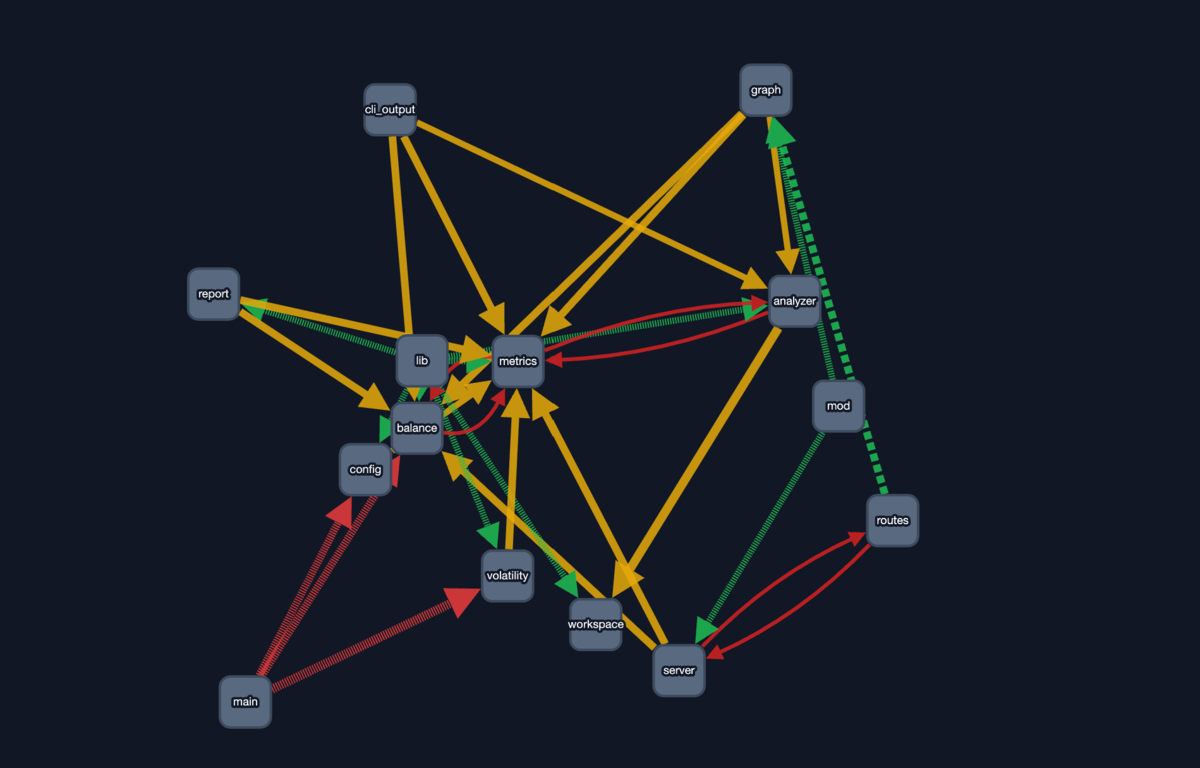
Visualize coupling relationships with an interactive graph.
cargo coupling --web ./src
A browser opens automatically, displaying an interactive graph using Cytoscape.js. Click nodes to see detailed information; problematic modules are color-coded.
CI/CD Integration
Beyond manual analysis, you can continuously monitor quality. Incorporating cargo-coupling as a quality gate enables early detection of coupling design degradation.
cargo coupling --check \
  --min-grade=B \
  --max-circular=0 \
  ./src
GitHub Actions example:
- name: Check coupling health
  run: |
    cargo coupling --check \
      --min-grade=B \
      --max-critical=0 \
      ./src
Returns exit code 1 when the grade falls below the threshold, making it easy to integrate into CI pipelines.
AI Integration
When using with Claude Code or GitHub Copilot, the --ai option is convenient.
cargo coupling --ai ./src
Output is formatted in an AI-friendly way, so you can paste it directly into AI tools to get refactoring suggestions.
Detected Problem Patterns
Having covered usage, you might wonder what specific problems get detected. Here are the representative patterns cargo-coupling warns about.
God Module
A module with too many functions, types, or impls.
- Functions: 30+
- Types: 15+
- Impls: 20+
High Efferent Coupling
A module with too many dependencies. Default threshold is 20+ dependencies.
High Afferent Coupling
A module depended on by too many others. Default threshold is 30+ dependents.
Cascading Change Risk
The combination of intrusive coupling and high volatility. A dangerous state where changes propagate across wide areas.
Interpreting Health Grades
Detection results are ultimately consolidated into a single grade representing overall project health.
| Grade | Description |
|---|---|
| S | Over-optimized. Might be over-refactored |
| A | Well-balanced. Ideal state |
| B | Healthy. Manageable condition |
| C | Room for improvement |
| D | Attention needed |
| F | Immediate action required |
Interestingly, S grade is considered "overdone." Why?
Reducing coupling too much fragments code excessively, making the big picture harder to see. Have you experienced needing to open 10 files to trace a single operation, or getting lost in abstraction layers so deep you wonder "what does this actually do?"
Coupling isn't simply "less is better." Balance is key.
Library Usage
Beyond the CLI tool, you can embed it in your own tools. cargo-coupling is also published as a library, allowing you to call analysis functions directly from code.
use cargo_coupling::{
    analyze_workspace,
    analyze_project_balance_with_thresholds,
    IssueThresholds,
    VolatilityAnalyzer,
};

fn main() -> Result<(), Box<dyn std::error::Error>> {
    // AST analysis
    let mut metrics = analyze_workspace(Path::new("./src"))?;

    // Git volatility analysis
    let mut volatility = VolatilityAnalyzer::new(6);
    volatility.analyze(Path::new("./src"))?;
    metrics.file_changes = volatility.file_changes;
    metrics.update_volatility_from_git();

    // Balance analysis
    let report = analyze_project_balance_with_thresholds(
        &metrics,
        &IssueThresholds::default()
    );

    println!("Grade: {}", report.health_grade);
    Ok(())
}
Performance
cargo-coupling is designed to run fast even on large projects.
- Parallel AST analysis with Rayon
- Stream processing of Git history
- Benchmarks: 655ms on tokio (488 files)
Use the --no-git option to skip Git analysis for even faster operation.
Limitations
While useful, this tool isn't omnipotent. Know these limitations before using it.
- External crate dependencies aren't analyzed: Dependencies on serde, tokio, etc. aren't analyzed since developers can't control them
- Static analysis only: Runtime behavior and macro expansion aren't fully captured
- Git history required: Volatility analysis needs Git history. Short history reduces accuracy
Conclusion
cargo-coupling provides a practical approach of "choosing appropriate coupling" rather than the simplistic view that "coupling is bad."
- 3-dimensional analysis: Considers strength, distance, and volatility simultaneously
- Git integration: Reflects actual change frequency as data
- Actionable suggestions: Presents concrete refactoring actions
- Multiple output formats: Text/JSON/Web UI/AI-friendly
- CI/CD integration: Automated checks as quality gates
You don't need perfect design. With a pragmatic attitude that "80% improvement is enough," gradually improve your project's health.
# Try it out
cargo install cargo-coupling
cargo coupling --summary ./src
Just visualizing coupling problems is the first step toward better design.
The next time you feel "I really don't want to touch this module..."—that's no longer a vague anxiety. It's a tractable challenge you can analyze across three dimensions of strength, distance, and volatility, and translate into concrete improvement actions. That feeling isn't something to fear; it's the entry point to improvement.
A related concept is "Complexity" from John Ousterhout's "A Philosophy of Software Design." It offers another valuable perspective and is well worth reading.
